Time Blocking 101: Practical Methods for Busy Professionals
A realistic breakdown of how to use time blocking to corral your tasks and protect your focus, even when your schedule is highly unpredictable.
📌 At a Glance (Key Takeaways)
- Time blocking assigns specific calendar hours to dedicated task categories rather than relying on open to-do lists.
- Eliminates multitasking friction and reduces context switching, which drains up to 40% of cognitive capacity.
- The 'Day Theme' method clusters similar tasks (meetings, creative work, administration) on specific days.
- Building 30-minute daily buffer blocks absorbs unexpected emergencies without derailing your schedule.
Direct Answer: Time blocking is a time management method where your day is divided into dedicated blocks of time, with each block assigned a specific task or category of tasks (e.g., deep focus, email triage, client meetings). Unlike open-ended to-do lists, time blocking forces you to respect the finite hours of your day, eliminating multitasking and decision fatigue.
Beyond the Simple To-Do List
For years, I operated strictly off a running to-do list. I would write down twenty tasks, start at the top, and feel a crushing sense of failure when I only crossed off four by 5 PM. The problem with a standard to-do list is that it completely ignores the reality of time and energy. It treats a 5-minute email and a 3-hour strategic report as identical bullet points. This is where time blocking changes the game.
What is Time Blocking?
Time blocking is the practice of dividing your day into specific blocks of time, and assigning a specific task or category of tasks to each block. Instead of keeping a list of what you need to do, you schedule when you are going to do it. It forces you to confront the reality of your limited hours.
How to Start Time Blocking
1. Determine Your Fixed Commitments: Start with a blank daily calendar. Block out the immovable anchors of your day: meetings, appointments, lunch breaks, and your hard stop time for the evening. Be realistic about commute times and transitions.
2. Identify Your Priorities: Look at your master to-do list and identify the 2 or 3 absolute highest priorities for the day. These are the tasks that move the needle.
3. Block the Deep Work: Assign your high-priority tasks to your peak energy hours. If you focus best at 9 AM, block 9 AM to 11 AM for that major report. Treat this block with the exact same respect you would treat a meeting with your boss. Do not check email. Do not take calls.
4. Batch the Shallow Work: "Shallow work" refers to the administrative tasks that keep the lights on: emails, Slack messages, quick approvals. Instead of answering emails all day long, create specific "batch blocks."
| Time Block | Category | Example Activities |
|---|---|---|
| 8:30 AM - 9:00 AM | Shallow Batch | Review inbox, check Slack, plan the day |
| 9:00 AM - 11:30 AM | Deep Work | Write strategic report (No notifications) |
| 1:00 PM - 3:00 PM | Meetings | Client calls, internal syncs |
| 4:00 PM - 5:00 PM | Shallow Batch | Final inbox sweep, organize tasks for tomorrow |
The Buffer Block
The most common reason people abandon time blocking is because they schedule every minute of their day, and when one task runs long, the whole schedule collapses. You must schedule buffer blocks. Leave 30 minutes in the afternoon entirely blank to absorb overflow. Time blocking isn't about rigid perfection; it's about giving your intentions a structural home in reality.
The Failure of the Traditional To-Do List: The Planning Fallacy
Traditional to-do lists are passive wish lists. They list 25 tasks without accounting for the single most important constraint: time. When you look at an open-ended list of 20 tasks, your brain naturally defaults to executing the easiest, least important tasks first (like clearing trivial emails) while postponing the cognitively demanding deep work.
Time blocking bridges the gap between intention and reality. By scheduling tasks onto an active calendar grid, you treat time as a physical spatial dimension, ensuring high-priority deliverables receive dedicated cognitive real estate.
The 4 Variations of Time Blocking
1. Classic Task Blocking
Assigning a specific 60-to-90 minute window to a single project (e.g., "10:00 AM - 11:30 AM: Draft Q3 Financial Report"). Ideal for analytical, focused deliverables.
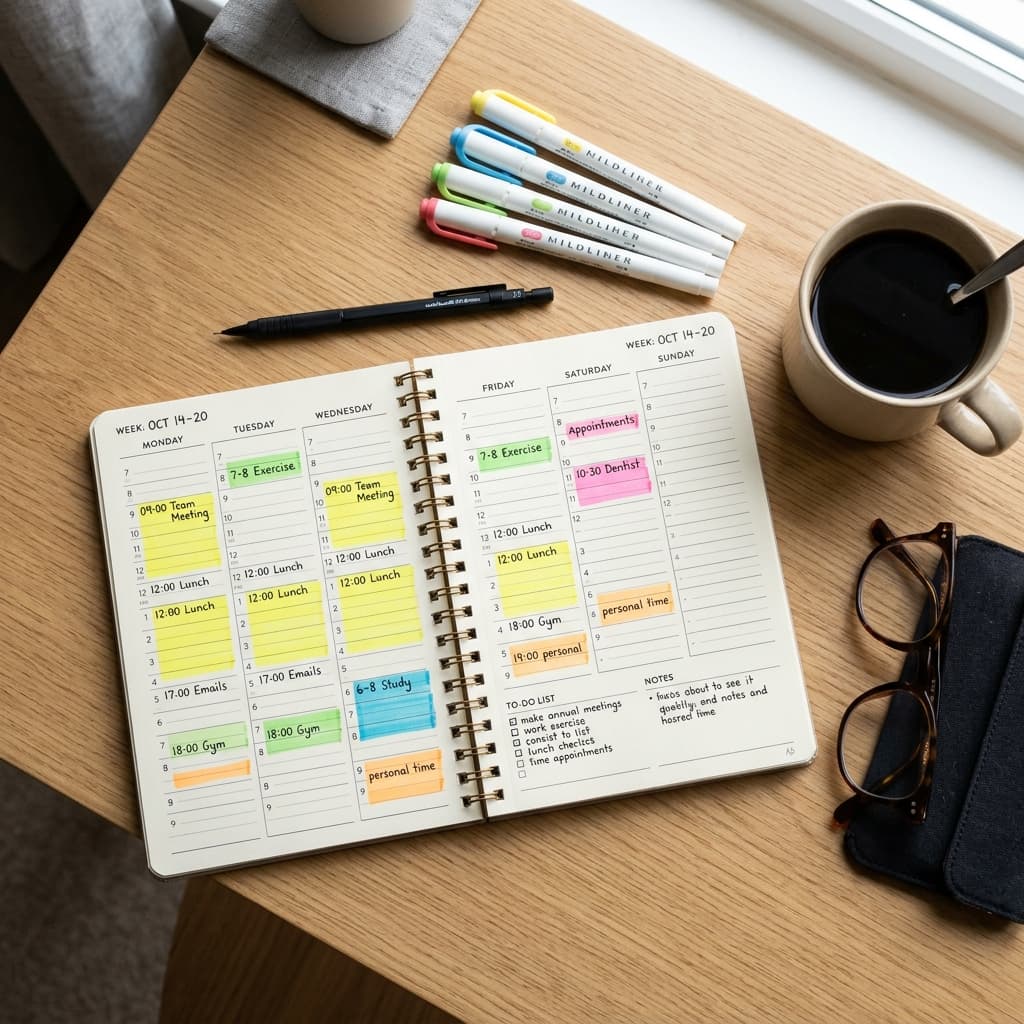
2. Day Theming
Assigning an overarching thematic focus to each day of the week:
- Mondays: Internal team alignment, 1-on-1s, and weekly planning.
- Tuesdays & Thursdays: Deep work, creative strategy, and analytical execution (Zero meetings).
- Wednesdays: External client meetings, partner calls, and reviews.
- Fridays: Administrative cleanup, invoicing, and weekly reset.
3. Time Batching
Grouping similar, repetitive micro-tasks together into a single block to minimize cognitive gear-shifting:
- Batching all email replies into two 30-minute blocks (11:30 AM and 4:00 PM).
- Batching all phone calls or expense reports into a single Friday afternoon block.
4. The Pomodoro-Block Hybrid
Dividing a 90-minute block into three 25-minute sprints separated by 5-minute movement breaks, maximizing focus without mental burnout.
Time Blocking vs. Reactive Scheduling Comparison Matrix
| Feature | Reactive To-Do List | Intentional Time Blocking | Productivity Outcome |
|---|---|---|---|
| Task Selection | Whatever screams loudest / easiest | Pre-planned strategic priority | High-impact goals completed |
| Email Management | Constantly open in background tab | Two dedicated 30-minute batches | 40% reduction in context switching |
| Workday Ending | Lingering feeling of unfinished tasks | Clear visual cutoff when blocks end | Guilt-free evening rest |
| Unplanned Crises | Completely derails the entire day | Absorbed by scheduled buffer blocks | Resilient operational calm |
Step-by-Step Guide: Setting Up Your First Time-Blocked Week
- Conduct a 3-Day Time Audit: Track how you actually spend your hours for 3 days to identify hidden time wasters.
- Block Personal Non-Negotiables First: Put sleep, exercise, family meals, and morning routines on the calendar first. Work must fit around life, not the other way around.
- Schedule 90-Minute Deep Work Windows: Place your highest-priority creative task during your peak biological energy window (usually 9:00 AM to 11:30 AM).
- Insert the Emergency Buffer Block: Schedule an empty 45-minute block every day at 3:00 PM labeled "Buffer / Spillover." This absorbs unexpected phone calls or late meetings without breaking your day.
Explore planning tools in Paper vs. Digital Planners and weekly prep in Sunday Reset Routine.
Behavioral Science & Sustainable Habit Mastery Protocol
Integrating new scheduling methods, wellness routines, and productivity frameworks into an already demanding lifestyle requires understanding the science of neuroplasticity and habit formation:
- The Power of Habit Stacking: Behavioral psychologist BJ Fogg demonstrated that new habits anchor best when attached to an existing, automatic routine. Use the formula: "After I [Current Automatic Habit], I will [New 2-Minute Habit]." (e.g., "After I pour my morning coffee, I will write down my Rule of 3 daily priorities.")
- Overcoming Friction & Cognitive Resistance: Motivation is an unreliable emotion that fluctuates with fatigue. Design your environment to make positive choices frictionless and distractions difficult (e.g., place your planner open on your desk, charge your phone across the room, and prep workout clothes before bed).
- Tracking Qualitative Energy Metrics: At the end of each week, spend 3 minutes reflecting on your energy levels: Which commitments energized you? Which drained you? Use these qualitative insights to continuously prune your calendar.
- The Grace of Non-Perfection: High achievers often abandon productivity systems the moment a single day is missed. Acknowledge that life is fluid and unpredictable. Missing one day is an anomaly; resuming the next day is the mark of true resilience.
- Establishing an Evening Digital Sunset: Power down email alerts and blue light screens at least 45 minutes before sleep to allow natural melatonin synthesis to initiate deep, restorative sleep cycles.
Frequently Asked Questions
What should I do when an unexpected crisis blows up my time blocks?
Don't abandon the system! Simply erase and redraw: slide your remaining blocks down into your afternoon buffer block, or push non-essential blocks to the next day.
How long should a deep work time block be?
Cognitive science suggests 90 minutes is the optimal human focus limit (aligned with ultradian rhythms). After 90 minutes, brain focus degrades unless followed by a 15-minute break.
Should I time block my weekends too?
Generally, no. Over-scheduling leisure time induces rigidity. Use broad themes for weekends (e.g., 'Saturday morning farmers market, Sunday afternoon reset') while keeping hours flexible.
What digital calendar tool is best for time blocking?
Google Calendar and Outlook are ideal because you can create color-coded sub-calendars (e.g., Deep Work, Admin, Meetings, Personal) to visualize your week's balance at a glance.